> ## Documentation Index
> Fetch the complete documentation index at: https://developer.fabric.inc/llms.txt
> Use this file to discover all available pages before exploring further.
# Importing Products
> Import product data through CSV upload to initiate enrichment.
Product Agent is currently in beta, and we're [seeking partners](https://fabric.inc/contact-us) to help shape its future.
The Product Activation page gives you visibility into your product data and category structure that Product Agent uploaded and ingested. This catalog forms the foundation for enrichment and scoring.
You can use this page to:
* Browse the products and categories that have been uploaded.
* Search and sort by product name, category, or ingestion status.
* Confirm that your core product data is ready for enrichment.
## Prerequisites
Provide your fabric Delivery Manager with two CSV files: one for your categories and one for your attributes. Your delivery manager will coordinate with you to ensure these files are uploaded and mapped.
## Product Information File Guidelines
Product information is uploaded through a CSV import. fabric recommends that you use the provided CSV template as a basis for your upload. It contains predefined column headers, some of which, such as SKU, category, breadcrumb, title, description, and images are required. However, the CSV template is set up for apparel, so there are a number of `attribute*` columns that won’t apply to every merchant.
The `attribute*` columns can be edited to fit the needs of your brand. For example, a furniture manufacturer would need `attribute*height`, `attribute*length`, and `attribute*width`.
The following table describes each column header included in the CSV template:
| **Column** | **Required** | **Description** |
| :------------------------------- | :----------------- | :------------------------------------------------------------------------------------------------------- |
| **sku** | Yes | Unique product ID. This must match your internal SKU and remain consistent across updates. |
| **category** | Yes | Primary product category. Used for benchmarking and enrichment. |
| **breadcrumb** | Yes | Full category hierarchy for the product, separated by a delimiter. Example: Home > Living Room > Chairs. |
| **title** | Yes | Product name as displayed on your PDP. |
| **description** | Yes | Full product description from your PDP. |
| **images** | Yes | URLs to product images. Multiple URLs can be separated by commas. |
| **attribute.colors** | Category dependent | Product colors. |
| **attribute.sizes** | Category dependent | Available sizes. |
| **attribute.materials** | Category dependent | Primary materials used in the product. |
| **attribute.age\_suitability** | Category dependent | Intended age group or suitability range. |
| **attribute.brands** | Recommended | Brand name associated with the product. |
| **attribute.patterns** | Category dependent | Pattern or print description. |
| **attribute.gender** | Category dependent | Intended gender audience. |
| **attribute.closure\_types** | Category dependent | Closure mechanism, such as, zipper, button, snap. |
| **attribute.care\_instructions** | Category dependent | Care or maintenance instructions. |
| **attribute.sleeve\_lengths** | Category dependent | Sleeve length information. |
## Procedure
To upload catalogs programmatically rather than through the UI, submit the file with [Upload artifact](/product-agent/api-reference/artifacts/upload-artifact), then create an optimization workflow against the returned `artifact_id` with [Create workflow](/product-agent/api-reference/optimize/create-workflow). Track progress with [Get workflow status](/product-agent/api-reference/optimize/get-workflow).
1. In the left menu, click **Product Agent** > **Activate**.
2. Do one of the following:
* To import products, click **Import**.
* To create an experiment using a CSV file, click **Create Experiment**, then select **Via CSV Import**.
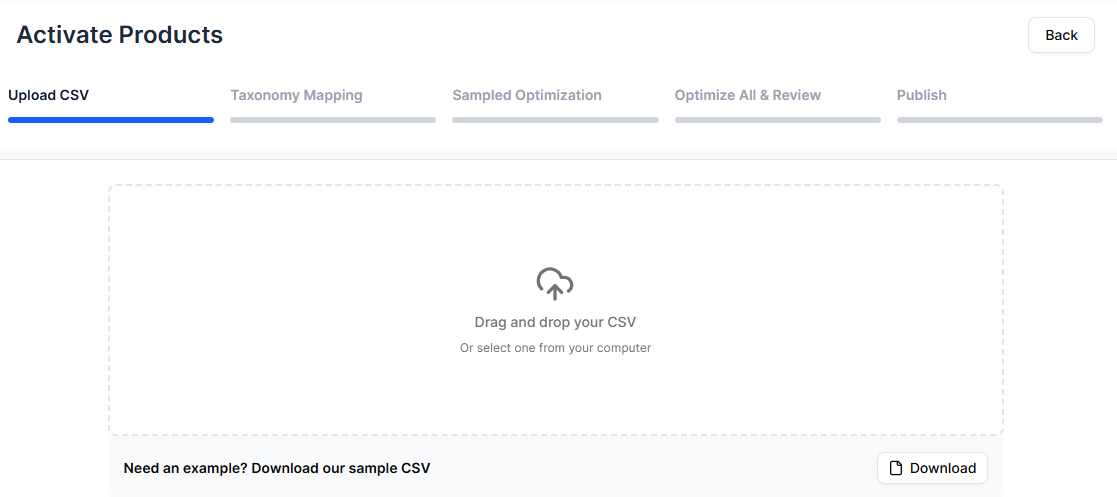
The **Upload CSV** menu is displayed.
If your products are already activated, you can skip this step by clicking **Enrich Products** and following the steps in [Enrich Products](/product-agent/activate/enriching-products).
3. (Optional) Click **Sample CSV** to download a sample file.
The file is downloaded.
4. To import a CSV file, do one of the following:
* Drag and drop a file into the upload box.
* Click anywhere inside the upload box to select a file from your computer.
 5. Click **Start Processing**.
Product Agent processes your upload. Depending on the size of the file, it may take some time.
5. Click **Start Processing**.
Product Agent processes your upload. Depending on the size of the file, it may take some time.
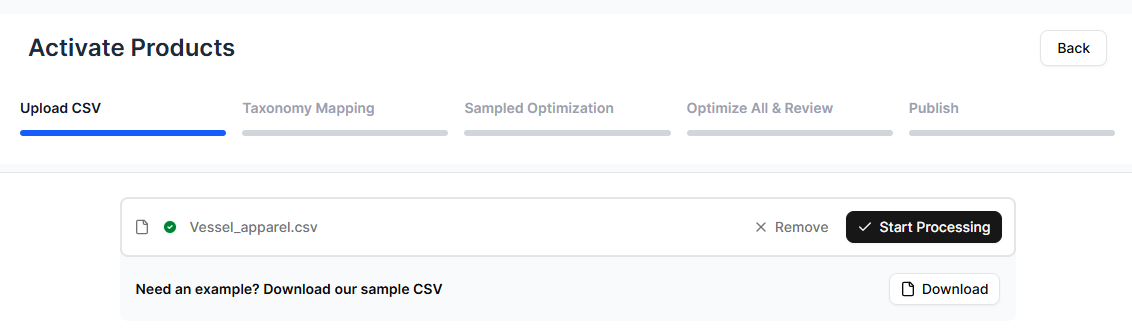 Once your products have been processed, you are automatically redirected to the next step in the process, [Taxonomy Mapping](/product-agent/activate/activating-products/taxonomy-mapping.mdx).
### Replacing or removing products
If you need to update or remove products after an import, upload a new CSV file with the corrected data.
To replace product information, include the same SKUs with updated values in the new CSV file. Product Agent will process the file and apply the updated data during import.
To remove products, delete those SKUs from the new CSV file before uploading.
To upload a new file, follow the steps above in **Importing Products**.
## Related Topics
* [Product Activation](/product-agent/activate/activating-products/introduction)
* [Experiments](/product-agent/activate/activating-products/experiments)
* [Taxonomy Mapping](/product-agent/activate/taxonomy-mapping)
* [Enriching Products](/product-agent/activate/enriching-products)
* [Sampled Enrichment](/product-agent/activate/sampled-enrichment)
* [Enrich All & Review](/product-agent/activate/enrich-all-review)
* [Publishing Products](/product-agent/activate/publishing-products)
Once your products have been processed, you are automatically redirected to the next step in the process, [Taxonomy Mapping](/product-agent/activate/activating-products/taxonomy-mapping.mdx).
### Replacing or removing products
If you need to update or remove products after an import, upload a new CSV file with the corrected data.
To replace product information, include the same SKUs with updated values in the new CSV file. Product Agent will process the file and apply the updated data during import.
To remove products, delete those SKUs from the new CSV file before uploading.
To upload a new file, follow the steps above in **Importing Products**.
## Related Topics
* [Product Activation](/product-agent/activate/activating-products/introduction)
* [Experiments](/product-agent/activate/activating-products/experiments)
* [Taxonomy Mapping](/product-agent/activate/taxonomy-mapping)
* [Enriching Products](/product-agent/activate/enriching-products)
* [Sampled Enrichment](/product-agent/activate/sampled-enrichment)
* [Enrich All & Review](/product-agent/activate/enrich-all-review)
* [Publishing Products](/product-agent/activate/publishing-products)