> ## Documentation Index
> Fetch the complete documentation index at: https://developer.fabric.inc/llms.txt
> Use this file to discover all available pages before exploring further.
# Companies
> Create and manage companies in Product Agent and organize brands under their parent companies.
Product Agent is currently in beta, and we're [seeking partners](https://fabric.inc/contact-us) to help shape its future.
The **Companies** tab in the Admin section of Product Agent allows you to create and manage companies within your organization.
In Product Agent, a **company** represents the top-level organization. This may be a retailer, brand owner, or agency.
A company can manage one or many **brands**. In some cases, a company and brand are the same entity. In others, such as agencies, a single company may manage multiple brands.
The Companies tab displays a table with the following information:
| Column | Description |
| :------ | :---------------------------------------- |
| Name | Company name. |
| Brands | The brands associated with the company. |
| Created | The date the company profile was created. |
## Prerequisites
You must have **Admin** credentials to create or manage companies.
## Procedures
### Creating a new company
To create a new company, take the following steps:
1. In the left navigation of Product Agent, click **Admin**.
The Users tab is displayed.
2. Click the **Companies** tab.
The **Companies** tab is displayed.
3. Click Create Company.
The **Create Company** window is displayed.
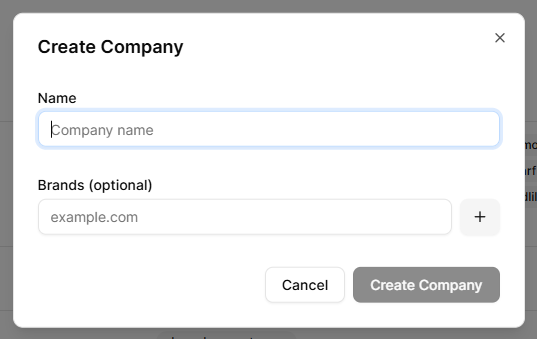 4. In the **Name** field, enter the company’s name.
5. In the **Brands (optional)** field, assign the company its associated brands.
6. Click **Create Company**.
The company is created.
### Editing a company
To edit an existing company, take the following steps:
1. In the left navigation of Product Agent, click **Admin**.
The Users tab is displayed.
2. Click the **Companies** tab.
The **Companies** tab is displayed.
1. In the list of companies, click on a company’s name.
The **Edit Company** window is displayed.
2. Edit the company's information as required.
3. Click **Save Changes**.
The company is updated.
## Related Topics
* [Overview](/product-agent/admin-settings/admin/overview)
* [Users](/product-agent/admin-settings/admin/users)
* [Brands](/product-agent/admin-settings/admin/brands)
4. In the **Name** field, enter the company’s name.
5. In the **Brands (optional)** field, assign the company its associated brands.
6. Click **Create Company**.
The company is created.
### Editing a company
To edit an existing company, take the following steps:
1. In the left navigation of Product Agent, click **Admin**.
The Users tab is displayed.
2. Click the **Companies** tab.
The **Companies** tab is displayed.
1. In the list of companies, click on a company’s name.
The **Edit Company** window is displayed.
2. Edit the company's information as required.
3. Click **Save Changes**.
The company is updated.
## Related Topics
* [Overview](/product-agent/admin-settings/admin/overview)
* [Users](/product-agent/admin-settings/admin/users)
* [Brands](/product-agent/admin-settings/admin/brands)