> ## Documentation Index
> Fetch the complete documentation index at: https://developer.fabric.inc/llms.txt
> Use this file to discover all available pages before exploring further.
# Adding a Prompt
> Create and manage custom search prompts to measure product visibility in AI-powered shopping engines
Product Agent is currently in beta, and we're [seeking partners](https://fabric.inc/contact-us) to help shape its future.
Product Agent automatically generates a set of prompts based on your enriched product data. These prompts reflect real-world, natural-language search queries that customers might use in AI-powered shopping experiences.
While Product Agent can generate high-quality prompts on its own, you can also add custom prompts to track performance for specific queries that are important to your business or brand.
## Procedure
1. Log into **fabric NEON**.
The **Visibility** page for **Monitor** is displayed by default.
2. Click the **Prompts** tab.
The **Prompts** page is displayed.
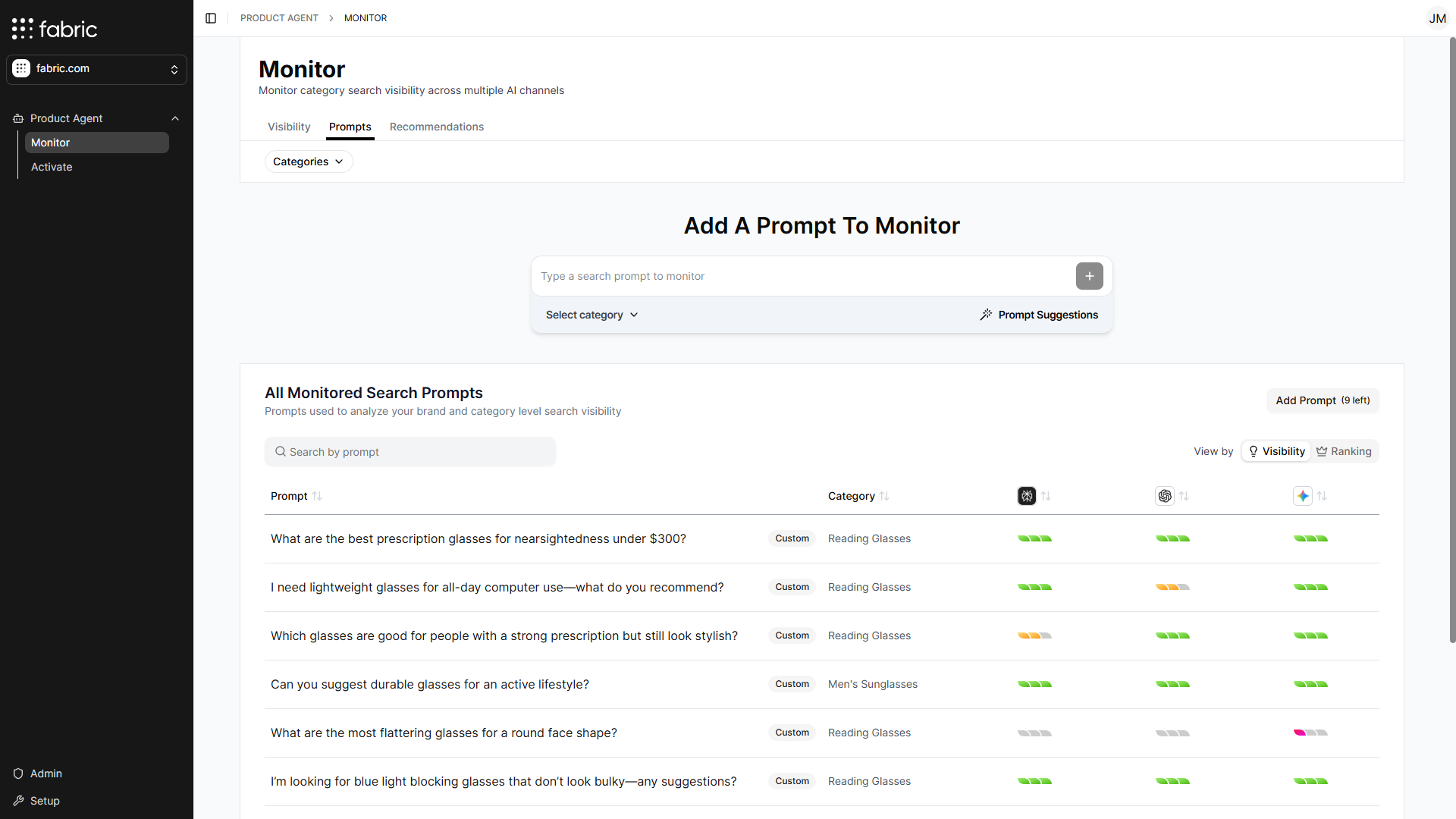 3. Do one of the following:
* Enter a prompt using the **Add a new prompt to monitor** text field.
* Click the **Add Prompt** button.
4. Select a product category for the prompt.
3. Do one of the following:
* Enter a prompt using the **Add a new prompt to monitor** text field.
* Click the **Add Prompt** button.
4. Select a product category for the prompt.
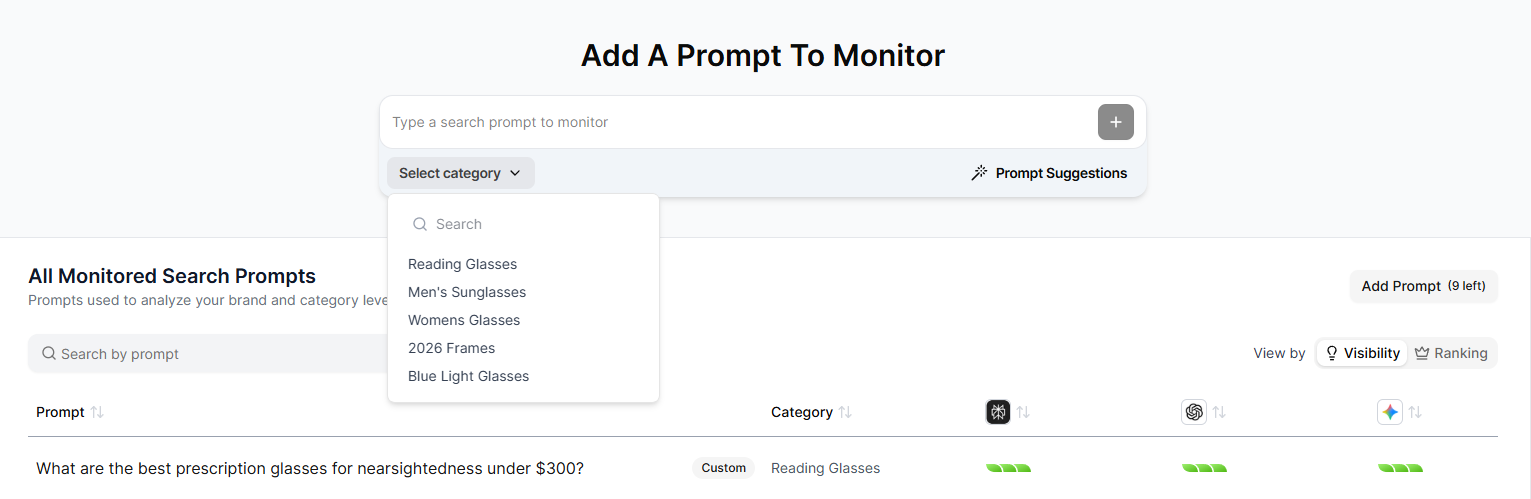 5. Do one of the following:
* If you used the text field to add a prompt, hit enter.
* If you used the **Add Prompt** button, click **Add**.
The prompt is added to your **Monitored Search Prompts** table.
## Using the Prompt Suggestion UI
The prompt Suggestion UI helps you generate prompts. These prompts can be manually edited or added as-is.
1. On the **Prompts** page, click **Prompt Suggestions**.
The **Customize & Add Suggested Prompts** window is displayed.
5. Do one of the following:
* If you used the text field to add a prompt, hit enter.
* If you used the **Add Prompt** button, click **Add**.
The prompt is added to your **Monitored Search Prompts** table.
## Using the Prompt Suggestion UI
The prompt Suggestion UI helps you generate prompts. These prompts can be manually edited or added as-is.
1. On the **Prompts** page, click **Prompt Suggestions**.
The **Customize & Add Suggested Prompts** window is displayed.
 2. In the **Select a Prompt Intent** section, use the **Category** field to select a category.
3. Do one or more of the following:
* **Price Range**: Generates prompts that include a specific price range.
* **Region**: Generates prompts that include a geographic region.
For example, if you select the Helmets category, set the Region to Canada, and choose a Price Range between 100 and 500, the generated prompts would resemble:
*“What are the best motorcycle helmets for daily commuting, priced between CAD 100 and CAD 500, available in Canada, and where can I purchase them?”*
4. Click **Generate Prompts**.
Product Agent automatically generates prompts based on your prompt intent criteria.
2. In the **Select a Prompt Intent** section, use the **Category** field to select a category.
3. Do one or more of the following:
* **Price Range**: Generates prompts that include a specific price range.
* **Region**: Generates prompts that include a geographic region.
For example, if you select the Helmets category, set the Region to Canada, and choose a Price Range between 100 and 500, the generated prompts would resemble:
*“What are the best motorcycle helmets for daily commuting, priced between CAD 100 and CAD 500, available in Canada, and where can I purchase them?”*
4. Click **Generate Prompts**.
Product Agent automatically generates prompts based on your prompt intent criteria.
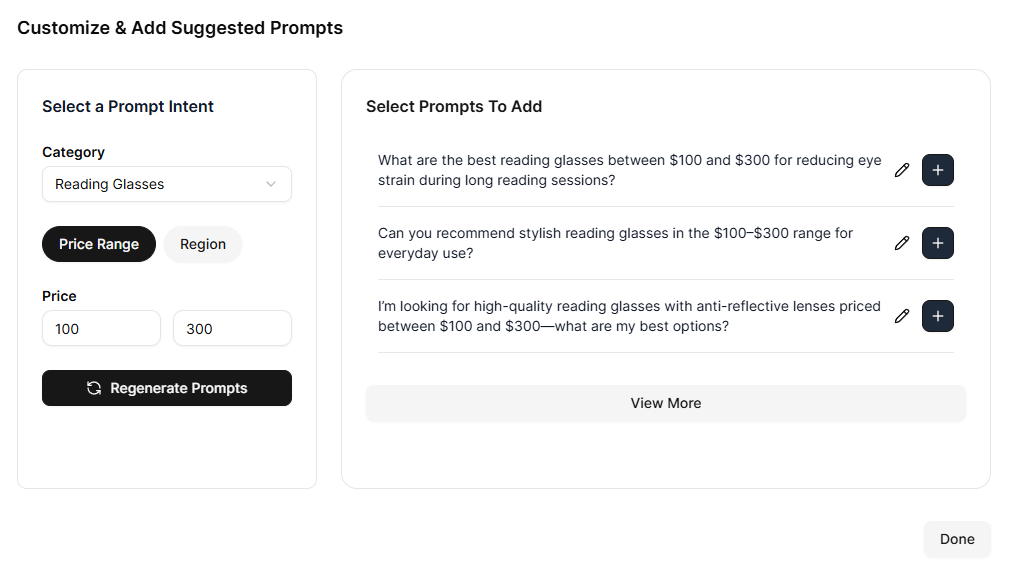 5. Optionally, you can edit any of the generated prompts by clicking the edit icon.
For unbiased visibility results, avoid using your own brand name in prompts.
6. Click the plus icon to add the prompt to your **Monitored Search Prompts**.
## Related Topics
* [Overview](/product-agent/monitor/overview)
* [Adding a Monitored Category](/product-agent/monitor/add-a-monitored-category)
* [Adding a Competitor for Monitoring](/product-agent/monitor/add-a-competitor)
* [Category Performance Report](/product-agent/monitor/category-performance-report)
* [Prompts](/product-agent/monitor/prompts)
* [Recommendations](/product-agent/monitor/recommendations)
5. Optionally, you can edit any of the generated prompts by clicking the edit icon.
For unbiased visibility results, avoid using your own brand name in prompts.
6. Click the plus icon to add the prompt to your **Monitored Search Prompts**.
## Related Topics
* [Overview](/product-agent/monitor/overview)
* [Adding a Monitored Category](/product-agent/monitor/add-a-monitored-category)
* [Adding a Competitor for Monitoring](/product-agent/monitor/add-a-competitor)
* [Category Performance Report](/product-agent/monitor/category-performance-report)
* [Prompts](/product-agent/monitor/prompts)
* [Recommendations](/product-agent/monitor/recommendations)