> ## Documentation Index
> Fetch the complete documentation index at: https://developer.fabric.inc/llms.txt
> Use this file to discover all available pages before exploring further.
# Category Performance Report
> View detailed category performance, including visibility, content depth, rankings, and AI search insights, with tools to compare against leaders or competitors and refine enrichment strategy.
Product Agent is currently in beta, and we're [seeking partners](https://fabric.inc/contact-us) to help shape its future.
The **Category Details** page provides an in-depth view into how a specific product category performs across AI-powered search and shopping platforms. Here, you can review high-level scores, explore visibility and content depth analysis, compare your category against market benchmarks or chosen competitors, and examine how common search prompts influence your ranking. This report reveals your category’s strengths and gaps across AI engines by comparing your performance with both fabric’s category leaders and your chosen competitors, providing a multi-dimensional view of your market position.
## Performance Overview
This section summarizes your category’s core performance metrics:
* **Visibility Score** (0–100) — Measures how easily your category is discovered across AI search platforms.
* **Content Depth** (0–100) — Evaluates the completeness and richness of product information within the category.
* **Category Ranking** — Indicates how your category ranks in AI search relative to others in the same space.
* **Top AI Channel** — Shows which AI engine (Gemini, ChatGPT, or Perplexity) your category performs best on.
These metrics provide a quick snapshot of your overall category health and where to focus improvement efforts.
 ## Analysis
The **Analysis** section includes two tabs, **Visibility** and **Content Depth**, each offering tailored insights into your category’s performance.
### Visibility tab
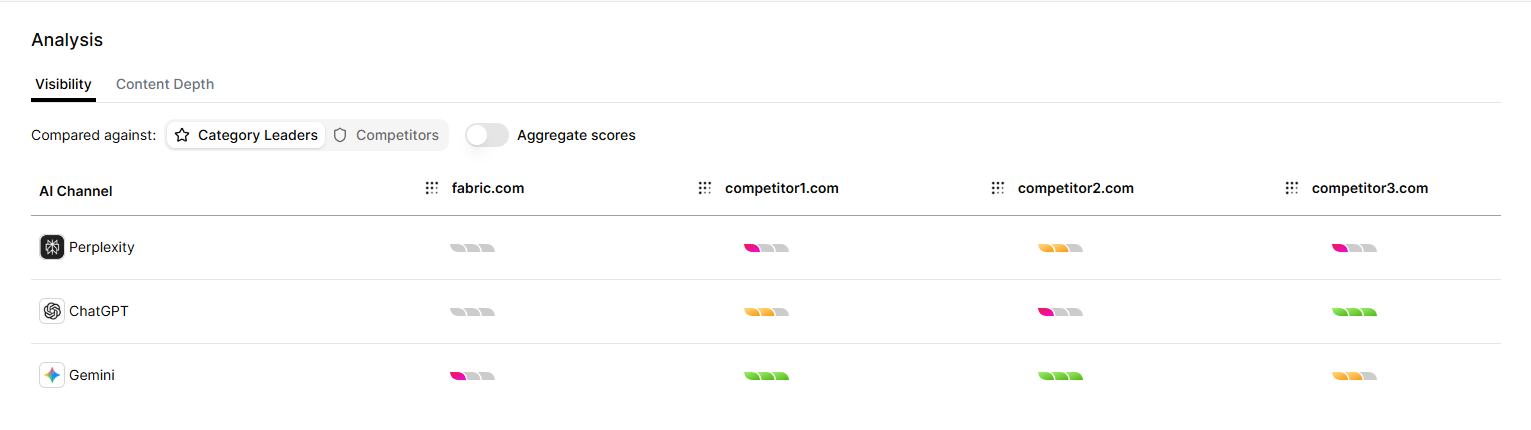
The Visibility tab (selected by default) allows you to examine how well your category surfaces in AI-driven shopping experiences.
You can configure the analysis by:
* Choosing a comparison group:
* Category Leaders
* Competitors
* Toggling aggregate scores:
* View consolidated vs. individual AI-engine results.
Visibility ranges from no visibility (blank) to low (red), medium (yellow), and high (green). All visibility metrics are presented in a table, organized by AI channel.
## Analysis
The **Analysis** section includes two tabs, **Visibility** and **Content Depth**, each offering tailored insights into your category’s performance.
### Visibility tab
The Visibility tab (selected by default) allows you to examine how well your category surfaces in AI-driven shopping experiences.
You can configure the analysis by:
* Choosing a comparison group:
* Category Leaders
* Competitors
* Toggling aggregate scores:
* View consolidated vs. individual AI-engine results.
Visibility ranges from no visibility (blank) to low (red), medium (yellow), and high (green). All visibility metrics are presented in a table, organized by AI channel.
 ### Content depth tab
Switching to the Content Depth tab reveals how comprehensive and well-structured your category’s product content is. The Content depth metric displays pre-optimization and post-optimization prediction scores. You can click **Optimize Category** to start the **Product Enrichment** process in [Activate](/product-agent/activate/overview).
### Content depth tab
Switching to the Content Depth tab reveals how comprehensive and well-structured your category’s product content is. The Content depth metric displays pre-optimization and post-optimization prediction scores. You can click **Optimize Category** to start the **Product Enrichment** process in [Activate](/product-agent/activate/overview).
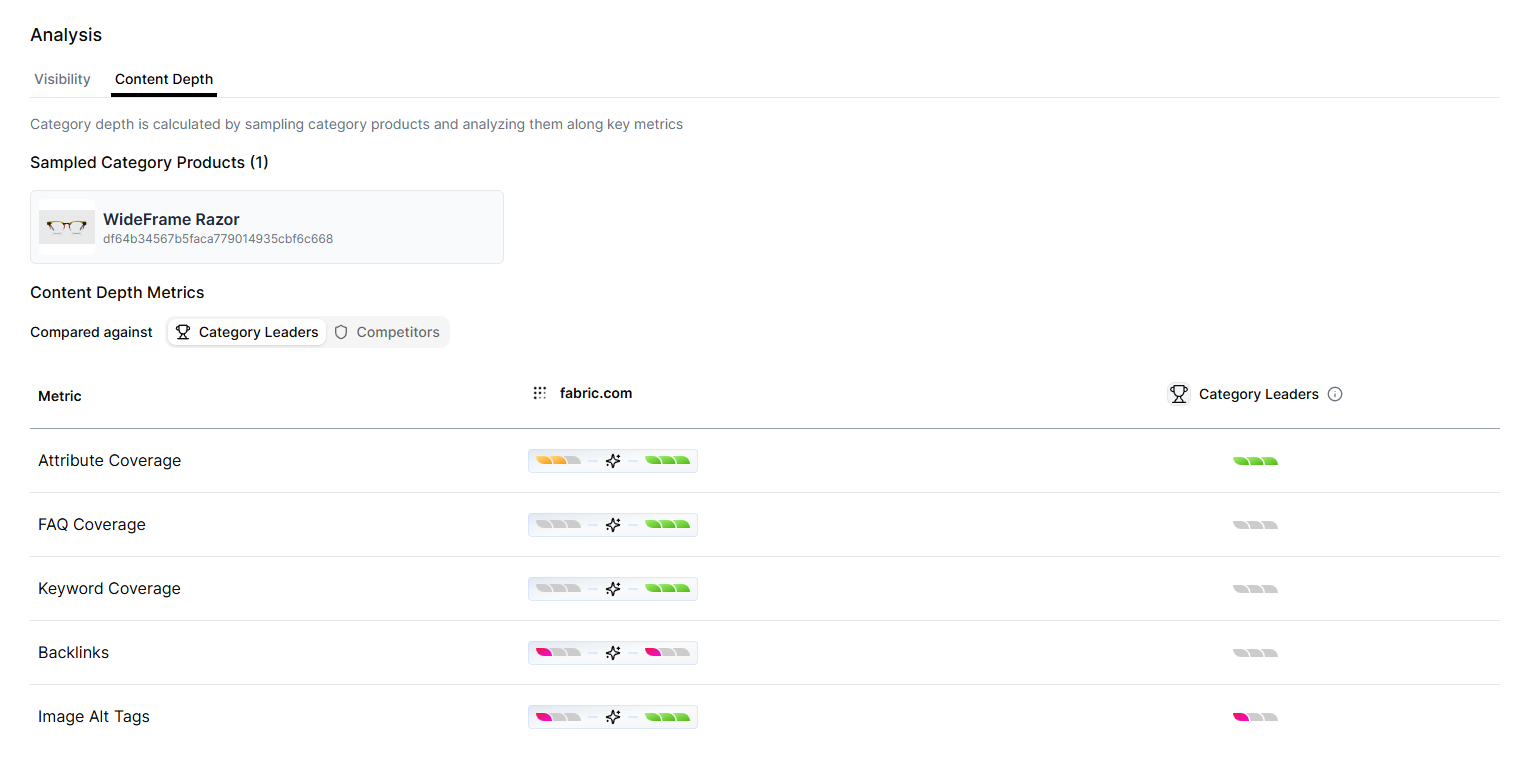 Category depth is calculated by sampling products within the category and evaluating them across key metrics. The table supports the same options as the Visibility tab:
* Choosing a comparison group:
* Category Leaders
* Competitors
Content Depth Metrics include:
| Row | Description |
| :--------------------- | :------------------------------------------------------------------------------ |
| **Attribute Coverage** | Measures how many key attributes your product listings include. |
| **FAQ Coverage** | Assesses the presence and completeness of question-and-answer content. |
| **Keyword Coverage** | Evaluates how effectively category-relevant keywords appear in product content. |
| **Citations** | Indicates whether claims or details are backed by trusted sources. |
| **Image Alt Tags** | Measures the presence and usefulness of alt text for product images. |
These insights highlight gaps in content quality and guide improvements that enhance category performance across AI systems.
## Tracked Search Prompts
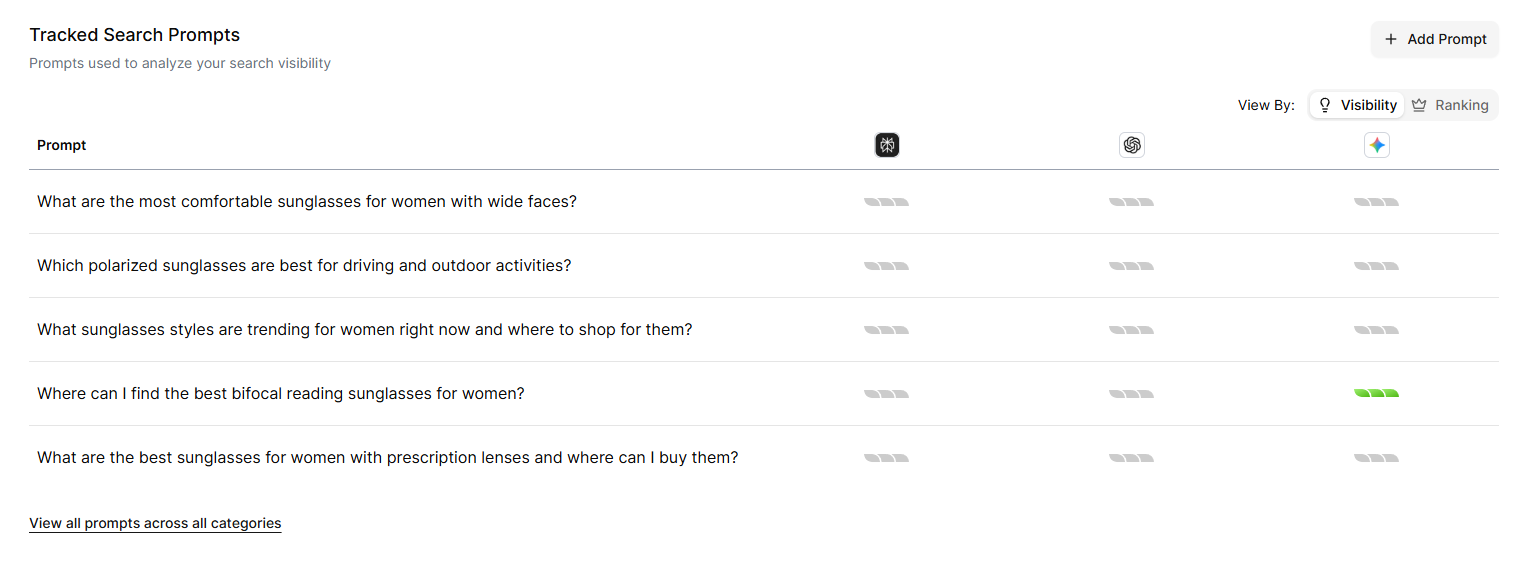
The **Tracked Search Prompts** section displays the prompts used to evaluate your search visibility. The table includes:
**Prompt** — The exact phrase used during analysis.
**AI Engines** (Perplexity, Gemini, ChatGPT) — Each column shows visibility scores using the same color indicators as other tables.
Category depth is calculated by sampling products within the category and evaluating them across key metrics. The table supports the same options as the Visibility tab:
* Choosing a comparison group:
* Category Leaders
* Competitors
Content Depth Metrics include:
| Row | Description |
| :--------------------- | :------------------------------------------------------------------------------ |
| **Attribute Coverage** | Measures how many key attributes your product listings include. |
| **FAQ Coverage** | Assesses the presence and completeness of question-and-answer content. |
| **Keyword Coverage** | Evaluates how effectively category-relevant keywords appear in product content. |
| **Citations** | Indicates whether claims or details are backed by trusted sources. |
| **Image Alt Tags** | Measures the presence and usefulness of alt text for product images. |
These insights highlight gaps in content quality and guide improvements that enhance category performance across AI systems.
## Tracked Search Prompts
The **Tracked Search Prompts** section displays the prompts used to evaluate your search visibility. The table includes:
**Prompt** — The exact phrase used during analysis.
**AI Engines** (Perplexity, Gemini, ChatGPT) — Each column shows visibility scores using the same color indicators as other tables.
 You can toggle the table between:
**Visibility Scores** — Numeric evaluations of how well your category appears.
**Ranking View** — Displays the top five businesses surfaced for each prompt.
### Adding a New Prompt
fabric automatically generates five baseline prompts for each category.
For unbiased visibility results, avoid using your own brand name in custom prompts.
1. Click **+ Add Prompt**
The **Add Prompt** window is displayed.
You can toggle the table between:
**Visibility Scores** — Numeric evaluations of how well your category appears.
**Ranking View** — Displays the top five businesses surfaced for each prompt.
### Adding a New Prompt
fabric automatically generates five baseline prompts for each category.
For unbiased visibility results, avoid using your own brand name in custom prompts.
1. Click **+ Add Prompt**
The **Add Prompt** window is displayed.
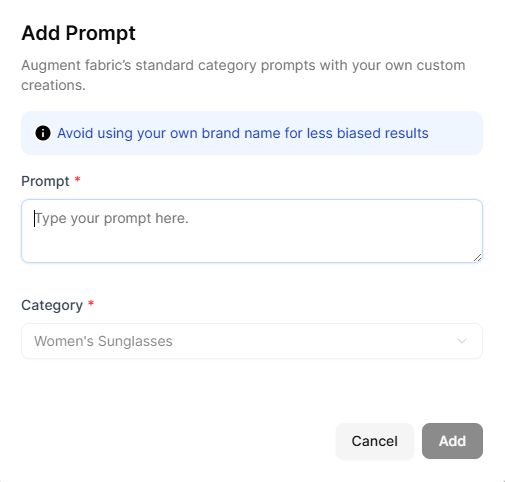 2. In the **Prompt** field, enter a prompt.
The **Category** field is preselected since you are adding a prompt within that category’s detailed view.
3. Click **Add**
Your prompt is added to the **Tracked Search Prompts** table for ongoing visibility monitoring.
## Related Topics
* [Overview](/product-agent/monitor/overview)
* [Adding a Monitored Category](/product-agent/monitor/add-a-monitored-category)
* [Adding a Competitor for Monitoring](/product-agent/monitor/add-a-competitor)
* [Prompts](/product-agent/monitor/prompts)
* [Adding a Prompt](/product-agent/monitor/add-a-prompt)
* [Recommendations](/product-agent/monitor/recommendations)
2. In the **Prompt** field, enter a prompt.
The **Category** field is preselected since you are adding a prompt within that category’s detailed view.
3. Click **Add**
Your prompt is added to the **Tracked Search Prompts** table for ongoing visibility monitoring.
## Related Topics
* [Overview](/product-agent/monitor/overview)
* [Adding a Monitored Category](/product-agent/monitor/add-a-monitored-category)
* [Adding a Competitor for Monitoring](/product-agent/monitor/add-a-competitor)
* [Prompts](/product-agent/monitor/prompts)
* [Adding a Prompt](/product-agent/monitor/add-a-prompt)
* [Recommendations](/product-agent/monitor/recommendations)