> ## Documentation Index
> Fetch the complete documentation index at: https://developer.fabric.inc/llms.txt
> Use this file to discover all available pages before exploring further.
# Experiment Performance
> Analyze experiment results and compare performance over time.
After you create and run an Experiment in [Activate](/product-agent/activate/activating-products/experiments), you can view its performance in Monitor.
The **Performance** tab in Monitor shows how enriched products (variant) perform compared to their original versions (control) over time. This helps you understand the impact of enrichment and decide how to apply changes across your catalog.
## Experiment Analytics
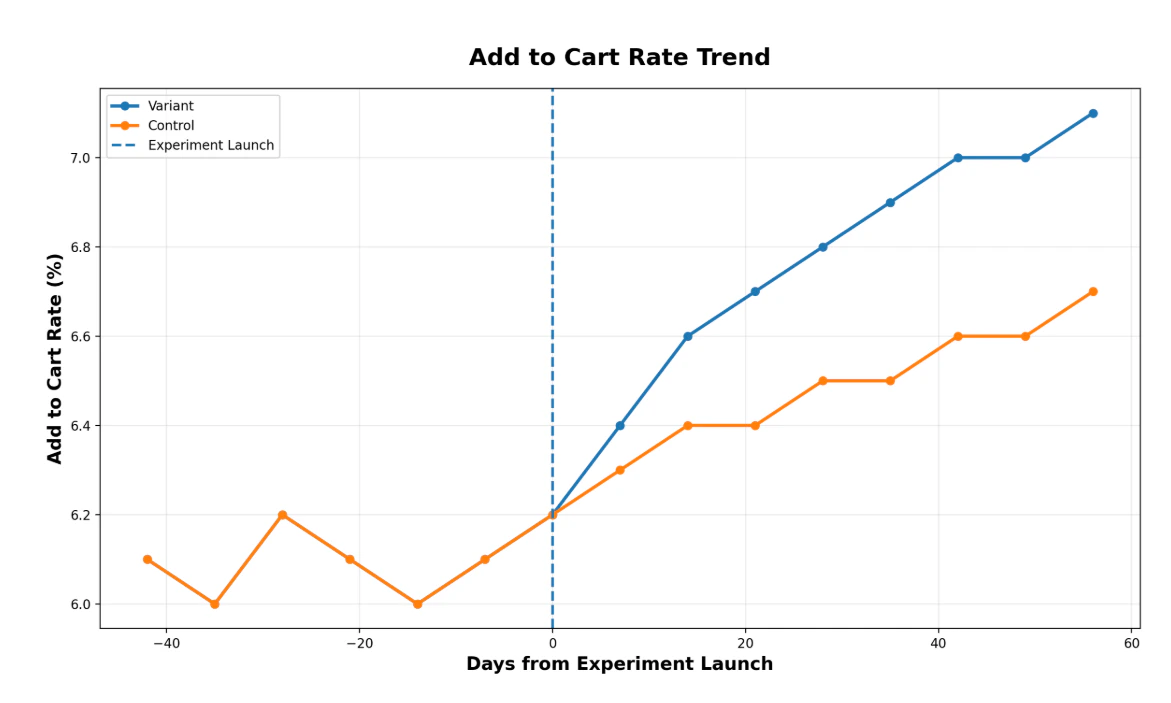
Each experiment includes a set of graphs that compare variant and control performance over time.
* The blue line represents the enriched products (variant)
* The orange line represents the original products (control)
* The vertical line marks the treatment date, when enriched products were published
* The horizontal axis shows days from treatment
Each experiment includes the following graphs:
| **Graph** | **Vertical axis** | **Use** |
| :------------------------- | :---------------------------------------------------------------------------------------------------------- | :----------------------------------------------------------------------- |
| **Total Sessions** | **Effect (%)**, which reflects the percentage change in sessions compared to the control group | Evaluate how enrichment impacts product visibility and traffic over time |
| **Total Page Views** | **Effect (%)**, which reflects the percentage change in page views compared to the control group | Evaluate how enrichment affects product engagement and discovery |
| **Add to Cart Rate Trend** | **Add to Cart Rate (%)**, which reflects the percentage of product views that result in add-to-cart actions | Evaluate how enrichment impacts conversion behavior |
 ### Products in the experiment
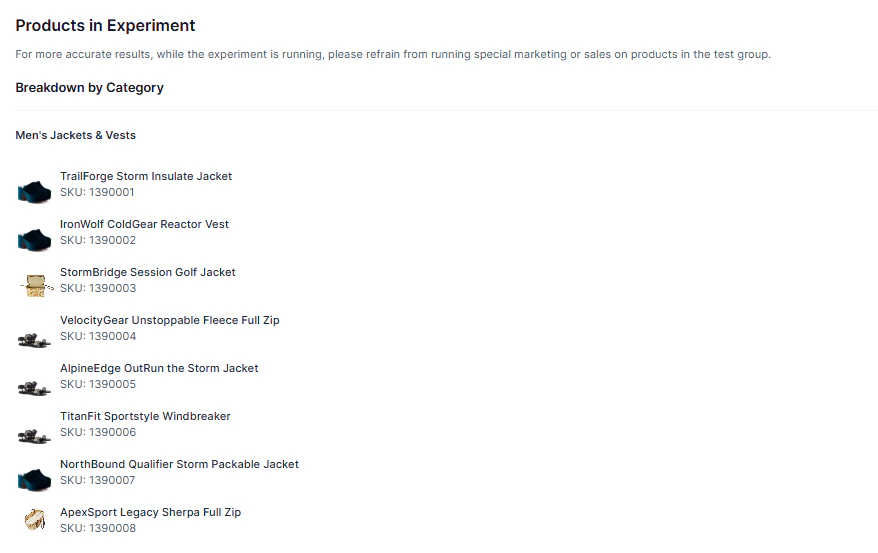
The **Products** tab in the **Performance** view displays all products included in the experiment.
This is a read-only view that allows you to review which products are included in the experiment and verify the scope of your results.
### Products in the experiment
The **Products** tab in the **Performance** view displays all products included in the experiment.
This is a read-only view that allows you to review which products are included in the experiment and verify the scope of your results.
 ## Prerequisites
* Ensure you have created at least one [Experiment](/product-agent/activate/activating-products/experiments) in Activate.
## Procedure
The following procedure details how to access data in **Performance**.
### Viewing experiment metrics
1. In the left menu, click **Product Agent** > **Monitor**.
The **Monitor** page is displayed on the **Visibility** menu.
2. Click **Performance**.
The **Performance** menu is displayed.
It shows all experiments, including their status, start and end dates, and progress.
3. To view the details of an experiment, hover over its title and click **View Details**.
The experiment is displayed on the **Analytics** menu.
4. (Optional) To view the products in the experiment:
* Click the button at the top-right to download a CSV file of the products in the experiment.
* Click **Products** to view the products in the experiment, broken down by category.
## Related Topics
* [Product Activation](/product-agent/activate/activating-products/introduction)
* [Experiments](/product-agent/activate/activating-products/experiments)
* [Importing Products](/product-agent/activate/activating-products/importing-products)
## Prerequisites
* Ensure you have created at least one [Experiment](/product-agent/activate/activating-products/experiments) in Activate.
## Procedure
The following procedure details how to access data in **Performance**.
### Viewing experiment metrics
1. In the left menu, click **Product Agent** > **Monitor**.
The **Monitor** page is displayed on the **Visibility** menu.
2. Click **Performance**.
The **Performance** menu is displayed.
It shows all experiments, including their status, start and end dates, and progress.
3. To view the details of an experiment, hover over its title and click **View Details**.
The experiment is displayed on the **Analytics** menu.
4. (Optional) To view the products in the experiment:
* Click the button at the top-right to download a CSV file of the products in the experiment.
* Click **Products** to view the products in the experiment, broken down by category.
## Related Topics
* [Product Activation](/product-agent/activate/activating-products/introduction)
* [Experiments](/product-agent/activate/activating-products/experiments)
* [Importing Products](/product-agent/activate/activating-products/importing-products)