> ## Documentation Index
> Fetch the complete documentation index at: https://developer.fabric.inc/llms.txt
> Use this file to discover all available pages before exploring further.
# Prompts
> Understand how your products surface in AI-powered shopping queries and monitor prompt-level visibility and competitiveness.
Product Agent is currently in beta, and we're [seeking partners](https://fabric.inc/contact-us) to help shape its future.
The **Prompts** page in **Monitor** shows how your product categories perform in response to search prompts used in AI-powered shopping experiences. These prompts simulate real-world queries, such as “lightest running shoes” or “most durable kitchen blender,” and help you understand where and how your categories are surfacing in generative search results. It also allows you to see competitive rankings and identify prompt-level coverage gaps you can address through enrichment.
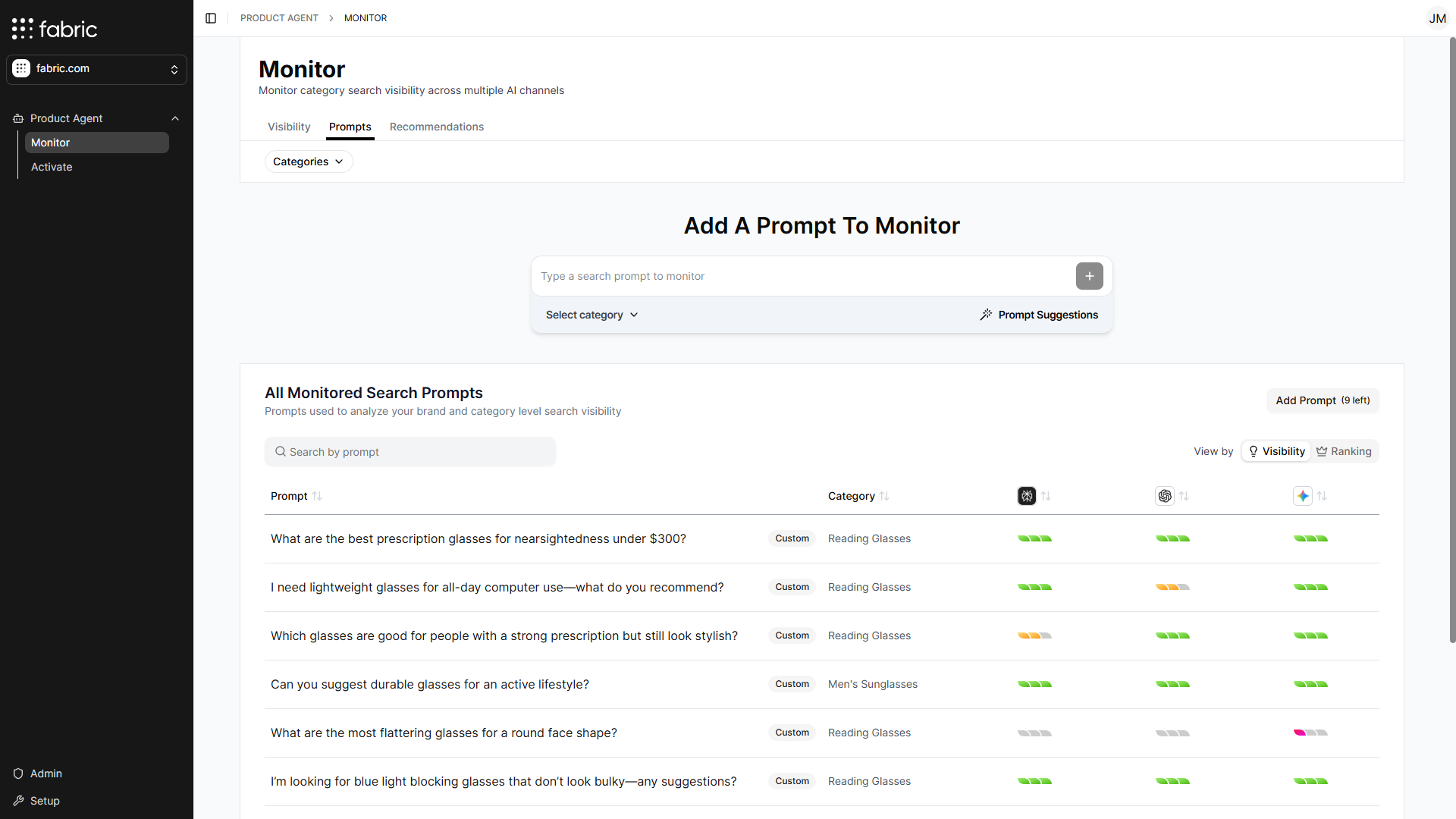 Product Agent automatically generates five prompts based on your product data. They are designed to reflect the kinds of natural-language queries customers might enter into AI engines when shopping for categories like yours. Prompts are inferred from product titles, attributes, descriptions, and categories. In addition to the auto-generated set, you can also create your own prompts to track how specific phrases or use cases perform over time.
You can use Prompts to:
* View how well your categories appear for high-intent, natural-language prompts
* See how your rankings compare to competitors at the prompt level
## Viewing Data
The Prompts tab has controls to create prompts as well as sort them based on title, category, and performance in individual AI engines.
The Prompts tab includes several controls that allow you to adjust how prompts are grouped and displayed. You can group prompts by product category, or choose whether to view them by visibility score or competitive ranking. Additionally, you can use the search field to find a specific prompt.
### Filtering by a category
Use the **Categories** dropdown in the top-left corner to select one or more categories. This filters the monitored search prompts to show only prompts associated with the selected categories. By default, prompts from all categories are displayed.
### Prompt table
To the top-right of the prompt table is a **view by** toggle for **Visibility** and **Ranking**. This toggle changes what's displayed in the table below.
Product Agent automatically generates five prompts based on your product data. They are designed to reflect the kinds of natural-language queries customers might enter into AI engines when shopping for categories like yours. Prompts are inferred from product titles, attributes, descriptions, and categories. In addition to the auto-generated set, you can also create your own prompts to track how specific phrases or use cases perform over time.
You can use Prompts to:
* View how well your categories appear for high-intent, natural-language prompts
* See how your rankings compare to competitors at the prompt level
## Viewing Data
The Prompts tab has controls to create prompts as well as sort them based on title, category, and performance in individual AI engines.
The Prompts tab includes several controls that allow you to adjust how prompts are grouped and displayed. You can group prompts by product category, or choose whether to view them by visibility score or competitive ranking. Additionally, you can use the search field to find a specific prompt.
### Filtering by a category
Use the **Categories** dropdown in the top-left corner to select one or more categories. This filters the monitored search prompts to show only prompts associated with the selected categories. By default, prompts from all categories are displayed.
### Prompt table
To the top-right of the prompt table is a **view by** toggle for **Visibility** and **Ranking**. This toggle changes what's displayed in the table below.
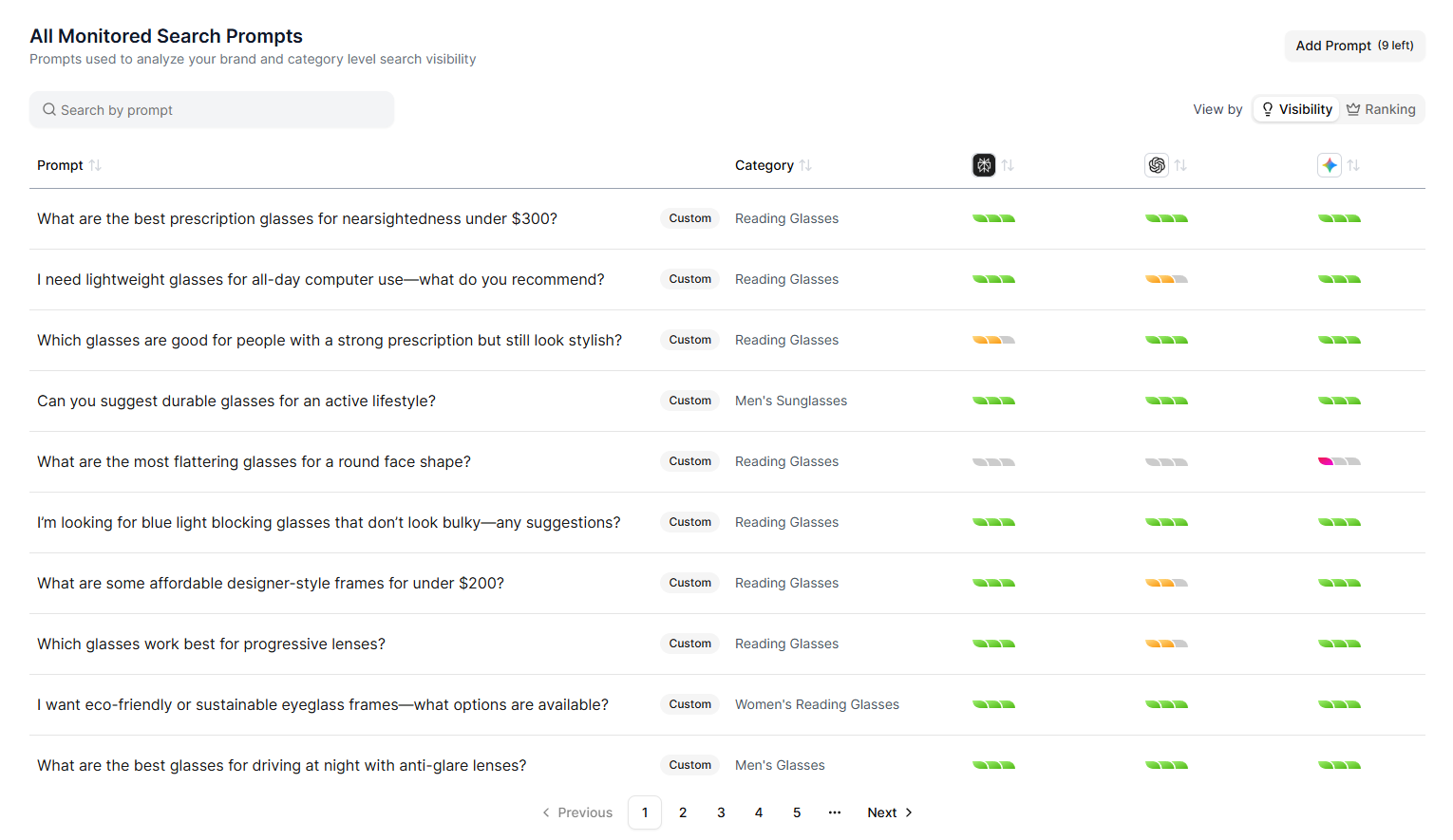 * **View by Visibility**: Displays color-coded indicators showing how well each AI engine surfaces your categories for the selected prompt.
* **View by Ranking**: Shows your search visibility ranking for each prompt in the selected category, along with the top five performers.
| Field | Description |
| :-------------------- | :------------------------------------------------------------------------------------------------------------------------------------------------- |
| **Prompt** | The prompt used to monitor your category-level search visibility. |
| **Category** | Displays a prompt's associated product category, such as *running shoes* or *kitchen tools*. |
| **Perplexity (icon)** | Shows a measured value of your visibility on Perplexity: green for high visibility, yellow for medium, red for low, and no color when not visible. |
| **ChatGPT (icon)** | Shows a measured value of your visibility on ChatGPT: green for high visibility, yellow for medium, red for low, and no color when not visible. |
| **Gemini (icon)** | Shows a measured value of your visibility on Gemini: green for high visibility, yellow for medium, red for low, and no color when not visible. |
## Exploring Prompts
The **Prompt Explorer** lets you dive deeper into how individual prompts perform across AI search engines. Hover over a prompt and click **Explore Prompt** to open the **Prompt Explorer** window.
* **View by Visibility**: Displays color-coded indicators showing how well each AI engine surfaces your categories for the selected prompt.
* **View by Ranking**: Shows your search visibility ranking for each prompt in the selected category, along with the top five performers.
| Field | Description |
| :-------------------- | :------------------------------------------------------------------------------------------------------------------------------------------------- |
| **Prompt** | The prompt used to monitor your category-level search visibility. |
| **Category** | Displays a prompt's associated product category, such as *running shoes* or *kitchen tools*. |
| **Perplexity (icon)** | Shows a measured value of your visibility on Perplexity: green for high visibility, yellow for medium, red for low, and no color when not visible. |
| **ChatGPT (icon)** | Shows a measured value of your visibility on ChatGPT: green for high visibility, yellow for medium, red for low, and no color when not visible. |
| **Gemini (icon)** | Shows a measured value of your visibility on Gemini: green for high visibility, yellow for medium, red for low, and no color when not visible. |
## Exploring Prompts
The **Prompt Explorer** lets you dive deeper into how individual prompts perform across AI search engines. Hover over a prompt and click **Explore Prompt** to open the **Prompt Explorer** window.
 ### Search sources view
By default, the **Prompt Explorer** opens in the **Search Sources** view and provides a breakdown of how AI search engines responded to a prompt, including:
* How your site ranked compared to competitors and other surfaced sites
* How many references were made for each site
### Search results view
Use the **Search Results** tab to understand product-level visibility:
* View which products were surfaced for the prompt
* Access direct links to surfaced products
* See results by AI search engine
Use the dropdown in the top-left corner to switch between:
* ChatGPT
* Gemini
* Perplexity
## Related Topics
* [Overview](/product-agent/monitor/overview)
* [Adding a Monitored Category](/product-agent/monitor/add-a-monitored-category)
* [Adding a Competitor for Monitoring](/product-agent/monitor/add-a-competitor)
* [Category Performance Report](/product-agent/monitor/category-performance-report)
* [Adding a Prompt](/product-agent/monitor/add-a-prompt)
* [Recommendations](/product-agent/monitor/recommendations)
### Search sources view
By default, the **Prompt Explorer** opens in the **Search Sources** view and provides a breakdown of how AI search engines responded to a prompt, including:
* How your site ranked compared to competitors and other surfaced sites
* How many references were made for each site
### Search results view
Use the **Search Results** tab to understand product-level visibility:
* View which products were surfaced for the prompt
* Access direct links to surfaced products
* See results by AI search engine
Use the dropdown in the top-left corner to switch between:
* ChatGPT
* Gemini
* Perplexity
## Related Topics
* [Overview](/product-agent/monitor/overview)
* [Adding a Monitored Category](/product-agent/monitor/add-a-monitored-category)
* [Adding a Competitor for Monitoring](/product-agent/monitor/add-a-competitor)
* [Category Performance Report](/product-agent/monitor/category-performance-report)
* [Adding a Prompt](/product-agent/monitor/add-a-prompt)
* [Recommendations](/product-agent/monitor/recommendations)